Configure a Device Alert Notification
When ADC specific device actions are executed from AppViewX, whether through Control Center or Dashboards, any resulting events or changes will be raised as alerts and captured in the alerts inventory. These alerts serve as notifications of the actions taken and their outcomes, allowing administrators to monitor and respond to the Device's behavior effectively.
To get the device alert notification, administrator has to configure as follows:
-
Go to Menu > ADC+ >
ALERTS & LOGS > Alerts
> ADC tab.
All the successful and failure events are captured in the alerts inventory along with the user comments. This enabled an Admin to track end-user actions.
-
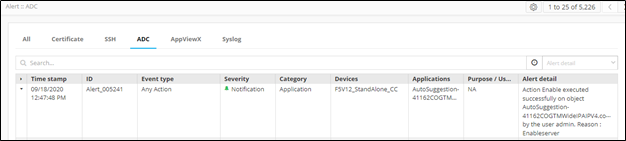
Every alert contains the following information:
-
Alert ID
-
Alert Event type
-
Severity
-
Category
-
Devices
-
Applications
-
Alert Detail
-
-
Search for any alert by the Device name or message etc.
All Successful actions are tagged as Notification and Failure as Critical alerts respectively.
-
Event type helps to identify the type of event - An action event or Restore
event or Backup event etc.
An example of Object Enable Alert:
 An example of Device status change
alert (Managed to Unmananged):
An example of Device status change
alert (Managed to Unmananged):