Using Sample Collection File
-
On the Collection page, from the command bar on the top right of the
screen, click
 (Download) icon.
-
On the Collection > Import page, to download a sample collection
file, from the top right corner of the screen, click
 (Download) icon.
A sample collection file <.xls> is downloaded to your computer.
(Download) icon.
A sample collection file <.xls> is downloaded to your computer. -
Open the downloaded file and define the keys and metadata as required. A sample
is shown here:
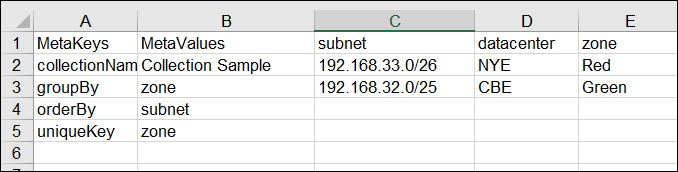
- Save the collection and import it into your instance.