Cloud-Discovery Configuration
Note: You cannot change the IP type while Amazon Web Services
(AWS) instances exist in the inventory for the selected IP type.
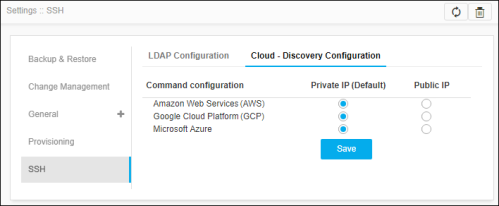
- Click the Cloud - Discovery Configuration sub-tab on the SSH tab.
-
In the Amazon Web Services (AWS) row, select any one of the following IP
types:
- Private IP - An IP address used within your private space. It is not directly exposed to the Internet.
- Public IP - An IP address that can be accessed over the Internet.
- Repeat Step 2 for the Google Cloud Platform (GCP) and Microsoft Azure rows.
- Click Save.