Steps for Integration
- On the Add credential page, select Thycotic from the left menu.
-
From the top right corner of the page, click Thycotic API
Settings.
The Thycotic API Settings po-up window is displayed.
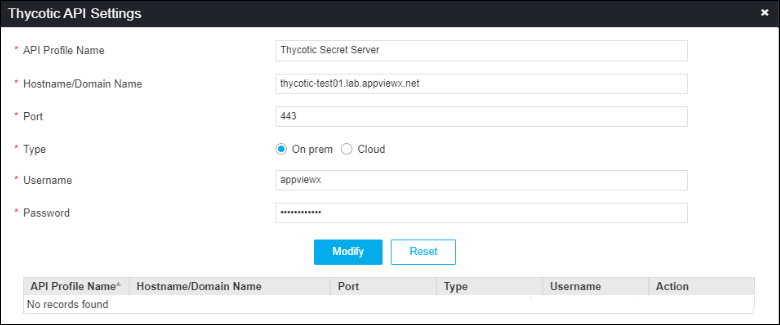
The following table describes the field information here:Field Description *API Profile Name Reference name for the vault in AppViewX. *Hostname/Domain Name Enter the Hostname of the Thycotic Secret Server if it is hosted in an on-prem environment or the Domain name of the Thycotc Secret Server if it is the cloud version. *Port Port number of the Thycotic Secret Server. *Type Select if Thycotic Secret Server is hosted in an On prem or Cloud environment. *Username Username of Thycotic Secret Server. *Password Password of Thycotic Secret Server. All * marked fields are mandatory. Note: You can add multiple Thycotic Secret Servers as different Profiles. Each Thycotic Secret Sever will be added to the Thycotic API settings page. - To modify the details of any profiles, click on the name of profile, modify the details and click Modify.
- To delete any profile, click delect icon in Action column of profiles