|
Sizing
|
Allows you to increase/decrease the height and width of
the widget. |
| Widget Background |
The following options are available here:
- Add Background Pattern: To add a
background pattern to the widget, select the Add
Background Pattern checkbox and select a
pattern from the available options.
- Widget Background Color: To add a
background color to the widget, deselect the Add
Background Pattern checkbox and select the
color from the color palette.
- Widget Border Color: Allows you to change the
color of the widget border.
|
|
Widget Header
|
The following options are available here:
- Header Text Color: Allows you to
change the color of the header text.
- Header Text Size: Allows you to
select the size of the header text.
- Header Text Underline: To underline the
header text, select the Header Text Underline
checkbox.
|
|
Tabular Header Style
|
The following options are available here:
- Header Background Color - Select the
background color for the header from the available
options.
- Header Text Color - Select the header text
color from the available options.
- Header Text Size - Select the header text
size from the available options.
- Header Text Alignment - Select the header
alignment as left, right or centre.
|
| Tabular Row Style |
The following options are available here:
- Row Background Color - Select the background
color for the row from the available options.
- Row Color - Select the row color from the
available options.
- Row Text Size - Select the row text size from
the available options.
- Row Text Alignment - Select the row alignment
as left, right or centre.
|
| Icon Style |
The following options are available here:
- Icon Color - Select the Icon Color from the
available options.
- Icon Background - Select the Icon Background
from the available options.
- Icon Background Color - Select the Icon
Background Color from the available options.
|
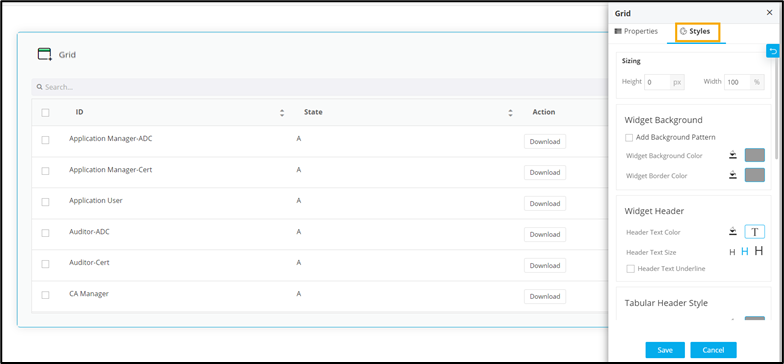 The following table describes the options available under the Styles tab: