Traffic Statistics Widget
Traffic statistics widget is used to monitor live/historic statistics of objects.
-
Add objects
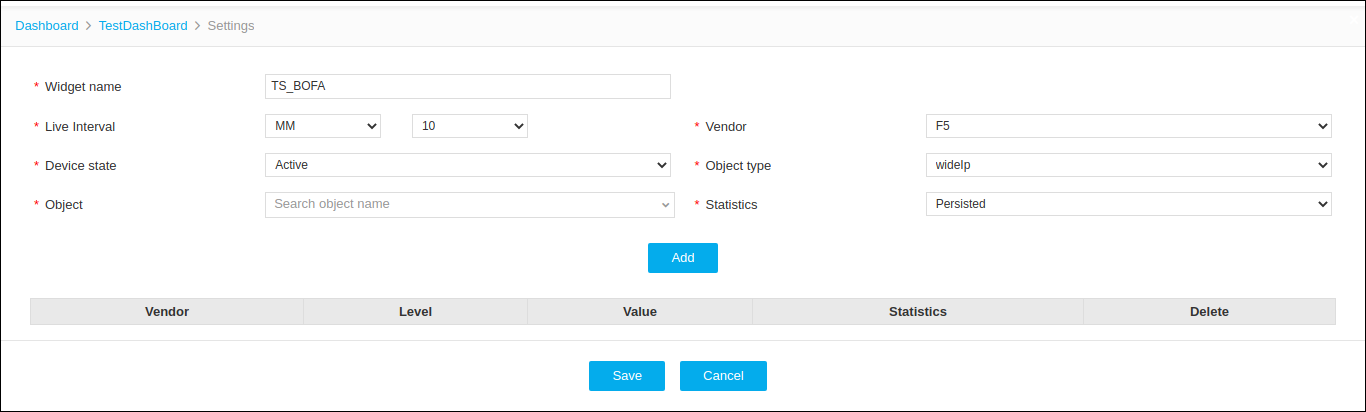
Table 1. Add objects - Field and Decription Table Name Description *Widget Name User defined Name for the Widget
No special characters are allowed, except '_' , '.' , '-' , '|' , ':'. The name should not start with a special character.
*Live Interval Set time interval for live statistics collection. *Vendor Statistics supported Vendors are listed *Device State Available options:
Active : Active devices are listed.
Standby : Standby devices are listed.
All : All Managed devices are listed.
*Object Type Based on the vendor, all supported object types are listed. *Object Based on vendor and object type filter available objects are listed. *Statistics Based on vendor and object type filter supported statistics parameters are listed. Alias Name Custom name for the object name. *: Mandatory fields - Provide the required information and click Add.
-
Click Save.
By default Live stats are collected. If Insight is enabled then historic statistics are shown.Widget Setting:
-
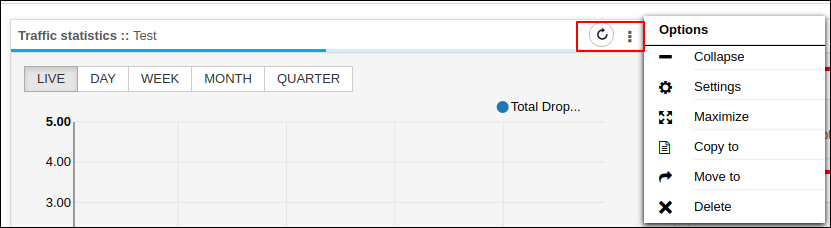
Refresh - Refreshing the widget will get live stats for the configured objects.
-
Collapse/Expand - Collapse and expand the widget screen
-
Settings - Configure the settings
-
Maximize - To maximize the widget size
-
Copy to - The widget is copied to another dashboard
-
Move to - The widget is moved to another dashboard.
-
Delete - Delete the widget
-