Custom Discovery Mode
To customize the discovery of an application:
-
Click
 and select
AppVision > Application.
and select
AppVision > Application.
- The Application screen opens with the Inframap tab selected by default.
-
Click
 in the command
bar. The Discovery screen that pops up displays all the pre-configured quick
discovery modes.
in the command
bar. The Discovery screen that pops up displays all the pre-configured quick
discovery modes.
-
Click
 beside the
Custom Discovery mode.
beside the
Custom Discovery mode.
-
At a minimum fill in all fields that contain a
 beside their names.
- Click Discover to trigger the discovery.
- A new Request ID is created. The request details along with their status are displayed in the Discovery status tab.
-
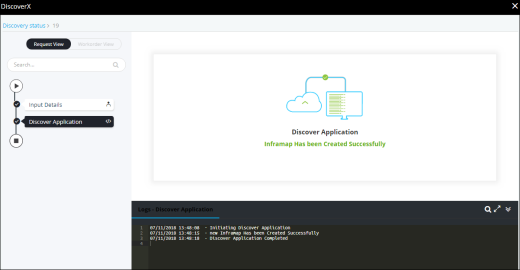
Click the Request ID to view the work order tasks or phases of the corresponding
request are listed in a tree-view. You can click each task to view its details.
Wherever applicable, all the logs related to the selected task are displayed in the Logs pane at the bottom of the screen.