Refresh the Component
To refresh the data:
-
Click
 and select Inventory > SSH.
The SSH screen opens.
and select Inventory > SSH.
The SSH screen opens. - If the Key tab is not displayed, click to open it.
- If the SSH key you want to access is not visible on the screen, use the Search field to locate it.
-
Click the link in the Key name column for the key.
The holistic view appears, with the SSH key displayed.
- Right-click on the
respective component (such as LDAP directory, AWS inventory, GCP
inventory, Azure account connector, Client device, and Server
device) as needed and select Refresh from the menu that
appears.
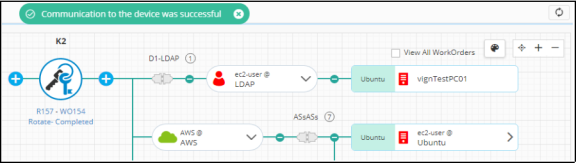
If the component is updated successfully, the following message is displayed: Communication to the device was successful.