View SSH Key Details
View Details on the SSH Key Tab
-
Click
 .
.
-
Navigate to Inventory > SSH.
The SSH screen opens.
- If the Key tab is not displayed, click to open it.
-
If the SSH key whose details you want to view is not visible on the screen, use the
Search field to locate it.
The following details appear for each SSH key:
- Key name
- Key group - Includes information as to whether the group has Read-Only or Read/Write access to the key.
- Encryption type - RSA, DSA, or ECDSA
- Encryption bit length - Varies depending on the selected encryption type
- Age of the key
- Created by - Creator of the key
- Client machines associated with the key
- Server machines associated with the key
- Compliance status - Compliant or Non-compliant
- Key status - Managed or monitored
- Associated users
- Compliance description - Indicates whether the encryption and the bit-length parameter are compliant or non-compliant
View Details from the SSH Key Holistic View
-
Click .
-
Navigate to Inventory > SSH.
The SSH screen opens.
- If the Key tab is not displayed by default, click to open it.
- If the SSH key whose details you want to view is not visible on the screen, use the Search field to locate it.
-
On the SSH key topology that opens, click
 on the side of the screen.
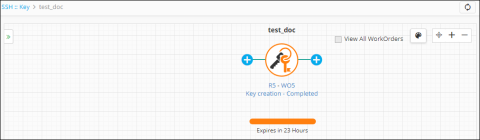 The details panel that appears lists the following information about the key:
- Key name
- User name
- Key creation date
- SSH Key group
- Any comments associated with the key
- Encryption type and length
- Key validity duration
- The compliance status of the key
- Key status
- Rotation time for the key
- Rotate automatically setting: enabled or disabled
- Push automatically setting: enabled or disabled
- Last rotate time
- Next auto-rotate time
- Key expiry date
- Last renewal date
Note: The details panel also contains a search field that allows you to search for any other SSH key without returning to the main SSH Key screen.