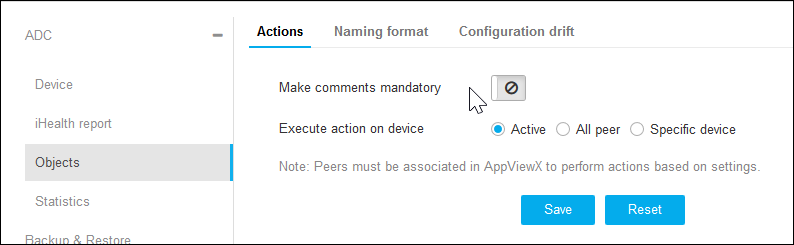
On the Objects details page, Actions are selected by default or click
Actions on the top.
Click to enable Make Comments Mandatory.
Select Active or All Peer or Specific Device radio buttons
for Execute Action on Device.
Click Save.
Click Naming Format on the top.
On the Display Name Format page, you could find the display name format
of vendors like A10, AVI, Akamai, AmazonELB, BigIQ, Cisco, Citrix, F5, HAProxy,
Infoblox, and NginxPlus.
Select the options available for respective vendors.
Click Save.
Click Configuration Drift on the top.
Enter the number of days in Store Configuration Drift for field.
 to enable Make Comments Mandatory.