Validate a Workflow
-
Click
 and select
Studio > Workflow.
The Workflow screen opens listing all the workflows in the system.
and select
Studio > Workflow.
The Workflow screen opens listing all the workflows in the system. -
Click the workflow you want to validate.
The workspace corresponding to the workflow opens.
-
Click
 at the top of the screen.
If the workflow is valid, a validation message appears at the top of the screen. If the workflow is invalid, the details are displayed in the Validation Report pane in the workspace, a sample of which is shown below.
at the top of the screen.
If the workflow is valid, a validation message appears at the top of the screen. If the workflow is invalid, the details are displayed in the Validation Report pane in the workspace, a sample of which is shown below.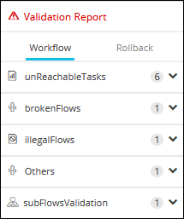
-
You can click
 or
or  beside each section to view or
hide the details respectively.
beside each section to view or
hide the details respectively.