 |
Allows you to toggle between a list view and grid
view of the components. |
| Search bar |
Allows you to search for a particular
component. |
| Branding |
Allows you to configure branding for your
page. |
| Quick links |
Allows you to add a quick links widget to your
page. |
| HTML |
Allows you to create your own HTML page within the
Page. |
| Embed page |
Allows you to Embed a page into the Page. |
| Button |
Allows you to add buttons for redirecting to
internal/external web pages from the catalog. |
| Layout |
Allows you to arrange widgets within a
layout. |
| Search
widget |
Allows you to add a search widget to the
page. |
| Group |
Allows you to create groups for clubbing similar
components/widgets together in the Page. |
| Alert |
Allows you to add and view Visual Workflow Alerts in
the Page. |
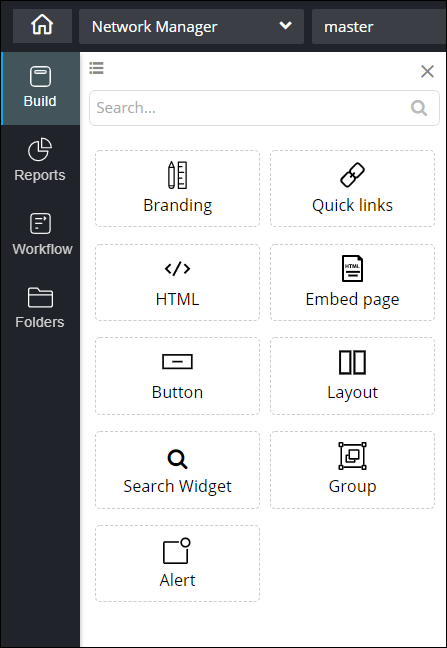 This table describes the options available in this section: