Infra as Code
-
Click
 and select AppVision >
Application.
The Application screen opens with the Inframap tab selected by default.
and select AppVision >
Application.
The Application screen opens with the Inframap tab selected by default. -
If you want to view the deployment history of a Blueprint, select the
application from the Blueprint tab and do the following. Open the
application whose history you want to review. On the workspace that opens, click
the Provision dropdown menu and select
 in the Command
bar. The deployment history screen opens with the Workflow tab selected
by default.
in the Command
bar. The deployment history screen opens with the Workflow tab selected
by default.
-
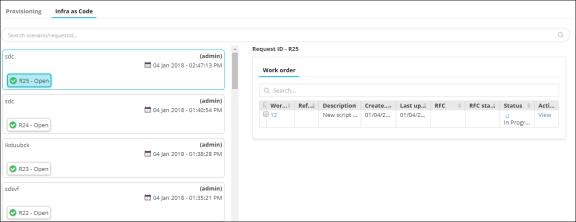
Click the Infra as Code tab.
A summary of requests and work order details for each Inframap is displayed. Click the View link in the Activity column to view the work order summary in a stage view.