Configuring the Group widget - Styles
-
For more options to customize the Group
component, in the Group window, click
Styles.
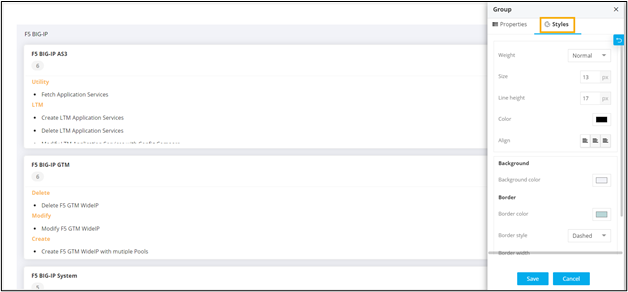
The following table describes the options available under the Styles tab:Option Description Weight The Weight dropdown list lets you set the font thickness of the field label using one of the following values: - Default
- Light
- Normal
- Thick
Size Allows you to increase/decrease font Size of the field name. Line height Allows you to increase/decrease the Line height of the field. This means the space between the field and the field border. Color Allows you to define the Color of the field label. Align Allows you to Align the field label to the left, center or right side of the field. Background Allows you to define the Background color for the HTML widget. Border Allows you to define the - Border color - Select the color of the layout border.
- Border style - Select the border style for the layout section from the options available in the dropdown.
-
Border width - Select the thickness of the layout border.
- To save your settings, click Save.
-
To restore the settings under Styles to default, click
