Authentication Settings
LDAP Authentication
Note: LDAP is selected by default or click LDAP on the
top.
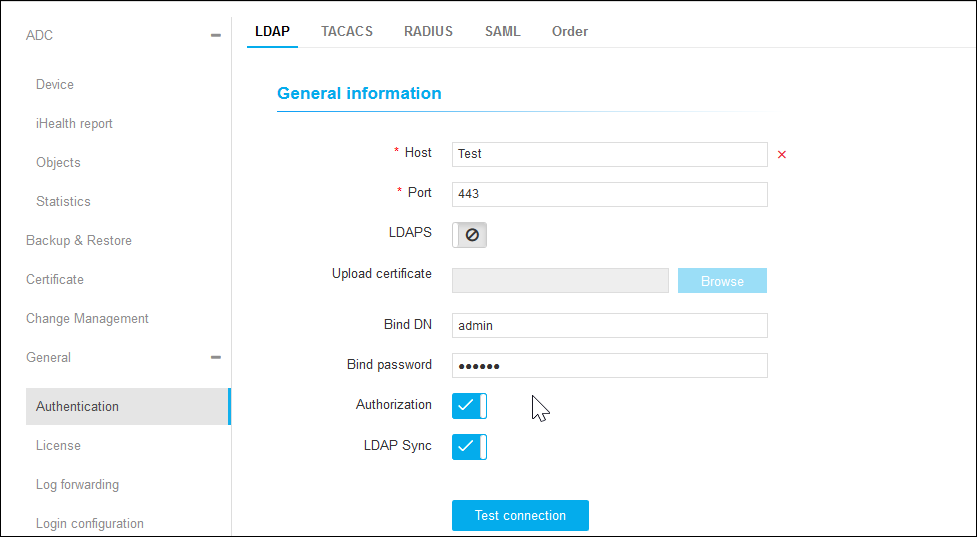
- On the LDAP details page, under General Information, enter the Host and the Port number.
-
Click
 to enable LDAP.
- In the Upload Certificate field, click Browse to choose a certificate.
- Enter the Bind DN and Bind Password.
- Click the respective to enable authorization and LDAP sync.
- Click Test Connection.
- Under User Search, enter the User Search Base, Search Filter, and User Return Attribute.
- Click Test Query.
- Under Group Search, enter the Group Search Base, Group Search Filter, and Group Return Attribute.
- Click Test Query.
- Click Save to display the LDAP details or click Reset to reset the settings.
TACAS Authentication
- Click TACACS on the top.
- On the TACACS details page, enter the Server Name, IP Address, and Port number.
- Click Test Connection.
- Enter Secret Key, Service, Protocol, and Authorization Attribute Name.
- Click Add to add the settings or click Reset.
- Added TACACS settings will be displayed on the left.
- To fetch user group, delete, enable, and disable TACACS settings, select the settings from the list view and click the respective icon on the top right.
RADIUS Authentication
- Click RADIUS on the top.
- On the RADIUS details page, enter the Server Name, Host, Shared Secret Key, Authentication Port, and Acceptance Port.
- Select the Authentication Mode (PAP/ASCII, CHAP, MS-CHAPv2, EAP-MD5).
-
Click to enable the Authorization.
- In the Authorization Via field, choose Radius or LDAP.
- Enter the Vendor ID and Vendor Type.
- Click Add to add the settings or click Reset.
- Added RADIUS settings will be displayed on the left.
- To fetch user group, delete, enable, and disable RADIUS settings, select the settings from the list view and click the respective icon on the top right.
SAML Authentication
- Click SAML on the top.
-
On the SAML details page, under SSO Information, click to enable SSO.
- In the MetaData field, click Browse to import an identity provider (IdP) metadata by browsing to an XML file.
- Enter the Issuer URL and SSO URL.
-
Click to enable SLO.
- Enter the SLO URL.
- In the Upload Certificate field, click Browse to choose a certificate.
- Click Save.
ORDER Authentication
- Click ORDER on the top.
- On the ORDER details page, you can enable or disable LDAP, TACACS, RADIUS, and LOCAL by clicking respective icons.
-
Click Save.