Configuring the Script Editor- Styles
-
For more options to customize the Ace Editor, in the Script
Editorwindow, click Styles.
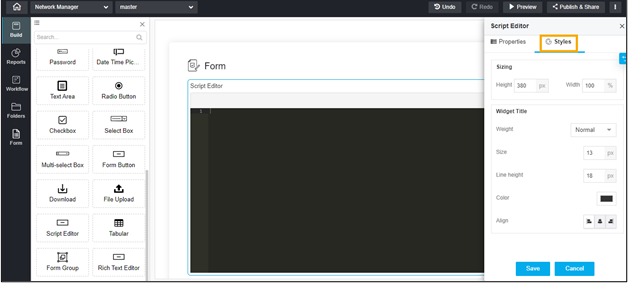
The following table describes the options available under the Styles tab:
Field Description Sizing Allows you to adjust the height and width of the Ace Editor field in the form. Widget Title The following options are availabel here: - Weight - Allows you to set the font thickness of the widget title as Default, Light, Normal, or Thick.
- Size - Allows you to increase/decrease the size of the widget title.
- Line height - Allows you to adjust the line height.
- Color - Allows you to set a color for the widget title.
- Align - Allows you to align the widget title to the left, right, or centre.
- To save your settings, click Save.
-
To restore the settings under Styles to default, click
 .
.