|
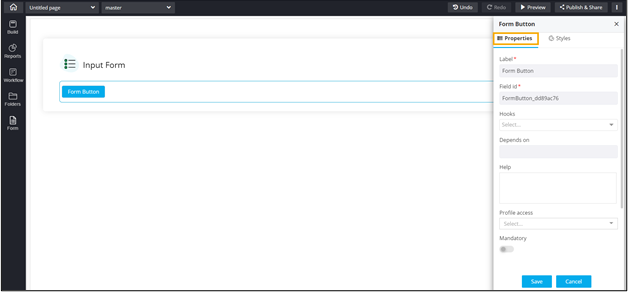
Label
|
Enter a valid Label name for the
form field. For example, Select Date and Time. |
| Field ID |
Allows you to assign a unique Field
ID to refer to the field name. |
| Help |
Allows you to add Help
text/tooltip for the field. |
|
Hooks
|
Allows you to assign an appropriate hook for this field.
For example, a hook to fetch the current date. |
|
Depends on
|
Allows you to define dependencies between form
fields based on ‘Field ID’ and ‘Values’. |
| Profile Access |
Allows you to select the profile from the dropdown to
restrict form field display within a template based on the
relevant profile. |
| Mandatory |
Allows you to define this field as
Mandatory or otherwise. If marked
as mandatory, an asterisk (*) is displayed next to the field
name in the form. |
| Read only |
Allows you to define this field as Read Only
or otherwise. If marked as Read Only, a red
crossed circle is displayed when you hover your mouse over
the read only field and does not allow you to enter any
information. |
| Hidden |
Allows you to hide the field in the form. |
| Select icons |
Allows you to select an icon for the Form Button from the
available options. |
 .
.