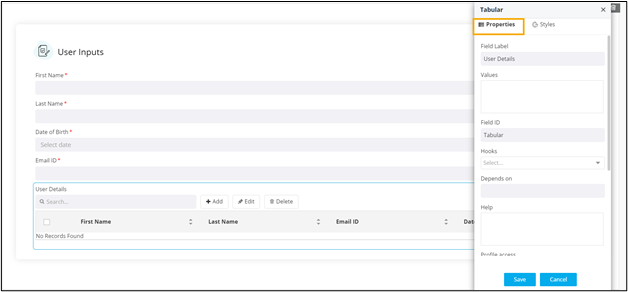
|
Label name*
|
Enter a valid Label name for the
form field. For example, Select Date and Time. |
| Values |
Allows you to define field Values relevant to a
form field.
- Values can be delimited by a comma.
- Characters not allowed: ‘&’ and
‘|’
|
| Field ID* |
Allows you to assign a unique Field
ID to refer to the field name.
- Allowed characters: ‘-‘ and ‘_’
- Character Length: Min (1), Max (50)
|
|
Hooks
|
Allows you to assign an appropriate hook for this field.
For example, a hook to fetch the current date.
- Select a hook that is relevant to the form
field.
- Hooks can be either Script or REST API.
- Hooks are used to fetch details against a specific
form field from the device and/or database and map
them to the respective field on the user
interface.
Note: For more information on
Assigning Hooks to Form Fields, click here. |
|
Depends on
|
Allows you to define dependencies between form
fields based on ‘Field ID’ and ‘Values’.
- Operators used: ‘&’ and ‘|’
- Max character: 550
- Format: [Field Id1: value1 & Field Id2: value1
& Field Id3: value3], [Field Id1: value1 | Field
Id2: value1]
|
| Help |
Allows you to add Help
text/tooltip for the field. |
| Profile Access |
Allows you to select the profile from the dropdown to
restrict form field display within a template based on the
relevant profile. |
| Mandatory |
Allows you to define this field as
Mandatory or otherwise. If marked
as mandatory, an asterisk (*) is displayed next to the field
name in the form. |
| Grid Universal Controls |
Allows you enable/disable the following features in the
Tabular:
- Search
- Pagination
- Actions
Note: For more information con
Grid Universal Controls,
click here. |
| All Asterisk (*) marked fields
are mandatory. |
 .
.