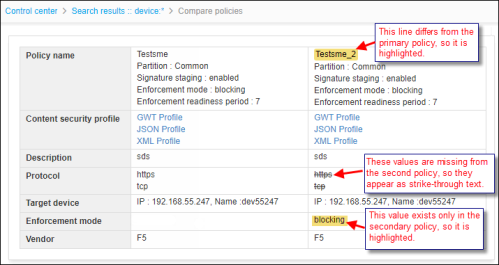
The WAF policy details then appear side-by-side on the Compare policies screen
with the following markups:
- Yellow highlights are used to indicate different content between the two policies.
In the image below, the name of the secondary policy differs from the first, so it is
highlighted. Highlighting is also used to indicate content that appears only in the
secondary or tertiary policy.
- Strike-through text is used to indicate policy components that appear in the primary
policy but are absent in the second and/or third policy. In the image below, the
primary policy lists HTTPS and TCP as the WAF protocols, but the
secondary policy does not contain any protocols so those values are struck out.
Note: If the HTTPS and TCP protocols had appeared only in the secondary
policy, they would have appeared as highlighted text rather than strike-through
text.

 in the Command
bar.
in the Command
bar.