Revoke a Certificate
To revoke a certificate:
-
Click
 and select
CERT+ > Certificate Inventory.
and select
CERT+ > Certificate Inventory.
- Under Certificate Inventory, click Server, Client, or Device depending on the type of certificate you want to revoke.
- On the Certificate Dashboard, click List on the top-right.
- On the certificate list view, click the Common Name of the certificate to view the topology.
-
Hover over
 on
the certificate and click Revoke.
on
the certificate and click Revoke. 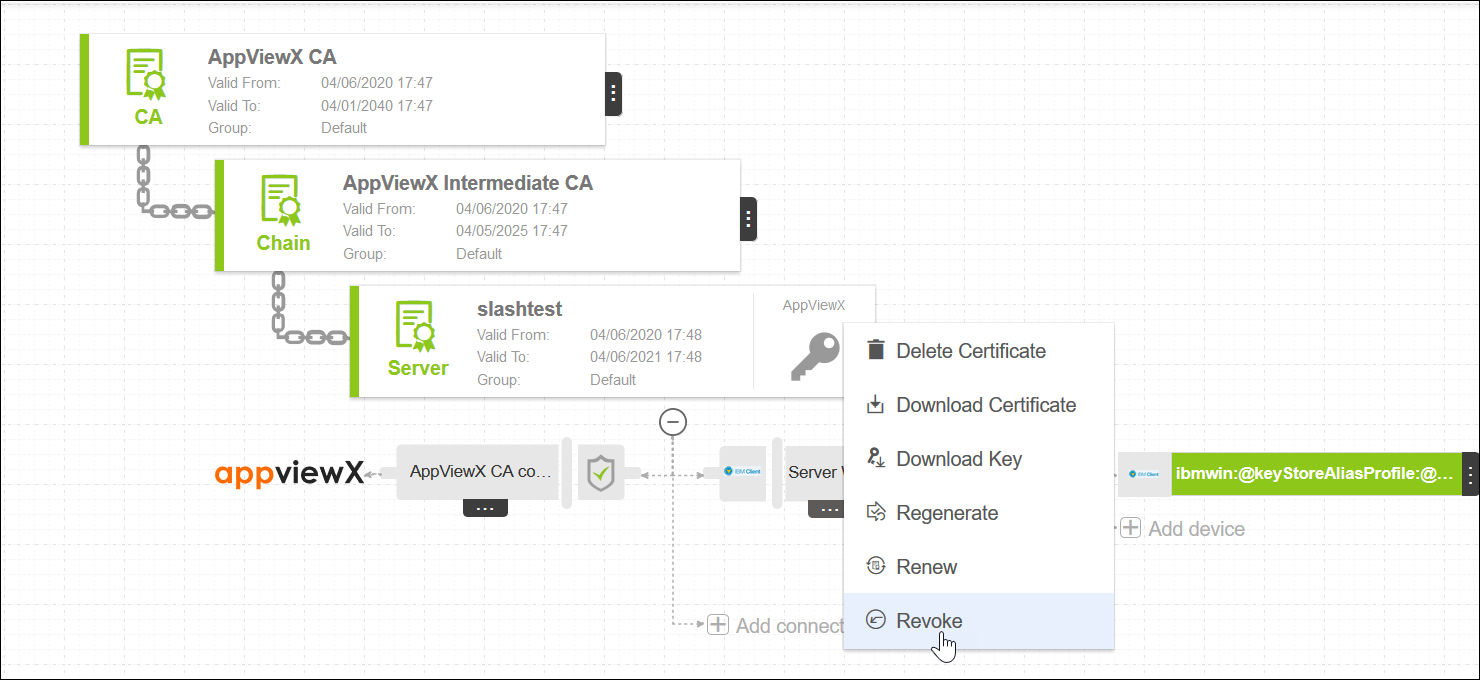
- On the Certificate Revoke pop up window, select a reason for revoking the certificate.
- In the Comments field, enter details for revoking the certificate.
-
Click Yes.
A request ID and work order ID will be generated automatically and the work order status will be displayed beside the certificate on the topological view.
- Click Approve to approve the revoke request.
-
On the Approve screen that pops up:
- Click On or Off button in the Manual Implementation field to choose the mode of implementation.
- If you select Off, set the date and time you want the certificate revocation approval to occur.
- Enter comments to approve the revocation, then click Yes.
The work order status will be displayed beside the connector. - Click the Refresh icon on the top until the topology updates.
- Click On or Off button in the Manual Implementation field to choose the mode of implementation.
- Click Implement to implement the revocation request.
-
On the screen that pops up:
- If you select Off, set the date and time that you want the certificate renewal implementation to occur.
- Enter comments to approve the revocation, then click Yes.
The work order status will be displayed beside the connector. -
Click
 on the top until
the topology updates.
After the revoke action is completed, the status updates to Completed.
on the top until
the topology updates.
After the revoke action is completed, the status updates to Completed.