Suspend Certificate
To suspend a certificate:
-
Click
 and select
CERT+.
The CERT+ left navigation pane appears.
and select
CERT+.
The CERT+ left navigation pane appears. - Switch to the List toggle button on the top right corner of the page.
- Click Server, Client, or Device tab depending on the type of certificate you want to suspend.
-
In the Common Name column certificate list, select the certificate that you want
to suspend.
The certificate topology appears on the screen.
-
Hover the mouse over
 on the certificate, and click the
Suspend option.
on the certificate, and click the
Suspend option.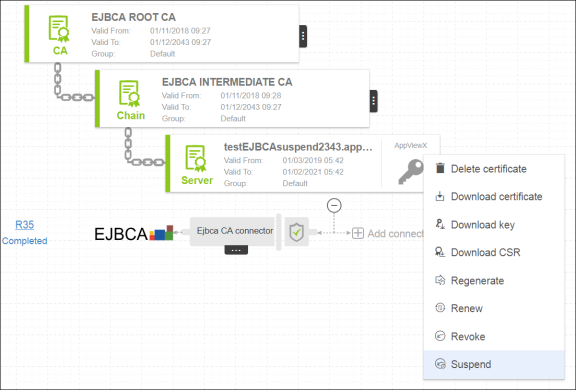
- In the Comments field, enter the reason for suspending the certificate.
- Click Yes.